

How to Choose a Fully Adjustable Office Chair (And Why It Matters)
- Updated:
About the author:

Ronel Hendry
“Create Healthy Workspaces”
Why your office chair may be causing discomfort
No two people have the same body shape or proportions. That's why an office chair that feels comfortable for one person may cause discomfort for another. A fully adjustable ergonomic chair adapts to your body by allowing you to customise the seat height, seat depth, lumbar support, backrest and armrests for proper support throughout the day.
If your lower back aches by the end of the day, your shoulders feel tight, or you constantly shift position trying to get comfortable, your chair may not be supporting your body properly. The problem is often not the quality of the chair, it's the fit. To accommodate our different body shapes, the design of modern office chairs includes greater adjustability.
A fully adjustable office chair allows you to customise the seat height, seat depth, backrest, lumbar support, armrests and recline to suit your body. When correctly adjusted, these features help maintain better posture, reduce pressure on joints and muscles, and encourage movement throughout the day.
Why Adjustability Is Important
A chair that cannot be adjusted forces your body into one position all day. Over time this increases pressure on muscles, joints and spinal discs. A fully adjustable chair allows you to maintain a neutral posture while changing position throughout the day, reducing fatigue and improving long-term comfort.
As explained by the Victoria Department of Health, sitting still or in an awkward position for long periods, can lead to cardiovascular, circulatory and musculoskeletal problems such as pain in your lower back, neck and shoulders. This can lead to the swelling of nerves and tendons that can cause pain in your elbows and arms. A fully adjustable office chair may alleviate some of these posture related health issues.
Do you need a fully adjustable office chair?
Not everyone does.
The amount of adjustability you need depends largely on how long you spend sitting, whether you have existing back issues, and whether the chair is shared between different users.
| If you.... | Recommended chair type |
|---|---|
| Sit for less than two hours a day | A basic chair is usually sufficient |
| Sit for 8 or more hours a day | Fully adjustable ergonomic chair |
| Have existing back pain | Orthopedic chair |
| Share your chair with others | Fully adjustable ergonomic chair |
What makes a chair fully adjustable?
Good ergonomic office chairs allow you to adjust several key areas independently. These include:
- Seat height
- Seat depth and seat angle
- Backrest angle and recline tension
- Lumbar support
- Armrests
- Headrest (where appropriate)
Not every adjustment is equally important. Some have a much greater effect on comfort than others.
Below are the main functions of modern ergonomic office chairs and some pointers on how to use their adjustability to suit your body. What is an ergonomic chair? Take time to know your chair, and understand the functions of the various knobs and levers before you start adjusting your office chair. For more details, see How to setup your office chair – a quick and easy guide.
Need a fully adjustable ergonomic chair?
1. Dynamic sitting: The adjustment many people overlook
One of the biggest misconceptions is that "good posture" means sitting perfectly upright all day. Your spine is designed to move.
Remaining in any static position for prolonged periods leads to muscle fatigue and discomfort.
Chairs that do not move with your body or are ‘locked’ into a fixed position, are static. Sitting statically for extended periods often leads to muscular pain in your back, neck and shoulders. By constantly stimulating these muscles and increasing the blood flow through them, such pain can be reduced. This is achieved when an office chair is fitted with a mechanism that allows Dynamic Sitting.
During ergonomic assessments, users often lock their chairs in a fixed position. Unlocking the recline to allow Dynamic Sitting can quickly improve comfort.
Ergonomist's Tip
People often assume they need a new office chair when they develop back pain. In many cases, the chair simply hasn't been adjusted correctly. Before replacing your chair, spend five minutes setting the seat height, lumbar support and backrest to suit your body. How to sit correctly at work.
2. Adjusting the seat height: The foundation of good posture
Seat height is critical. When you adjust the height of your chair, your feet should be flat on the floor with your knees slightly below the level of your hips. What is the correct height for my desk, computer monitor and office chair?

Seat height adjustment
Left: Seat height is too low and angle of the elbows is less than 900. Forearms are not parallel to the floor.
Right: Seat is too high and angle of the elbows is greater than 900. Again, forearms are not parallel to the floor. The hunched back typically results in muscular pain in the upper back and shoulders.
Ergonomist's Tip
- Do not adjust the seat too low. If you lower the seat too far, your knees will be higher than your hips, putting more strain on your lumbar discs and hip joints. Furthermore, to reach the work surface, you will have to lift your arms, which creates muscular strain in your shoulders and neck.
- Do not sit on the front edge of the seat. Doing so means that the backrest will not be supporting your back. If you have to sit on the front edge of the seat so that your feet touch the floor, then use a footrest.
3. Why is seat depth adjustment (seat slider) important?
Not all office chairs have a seat slider.
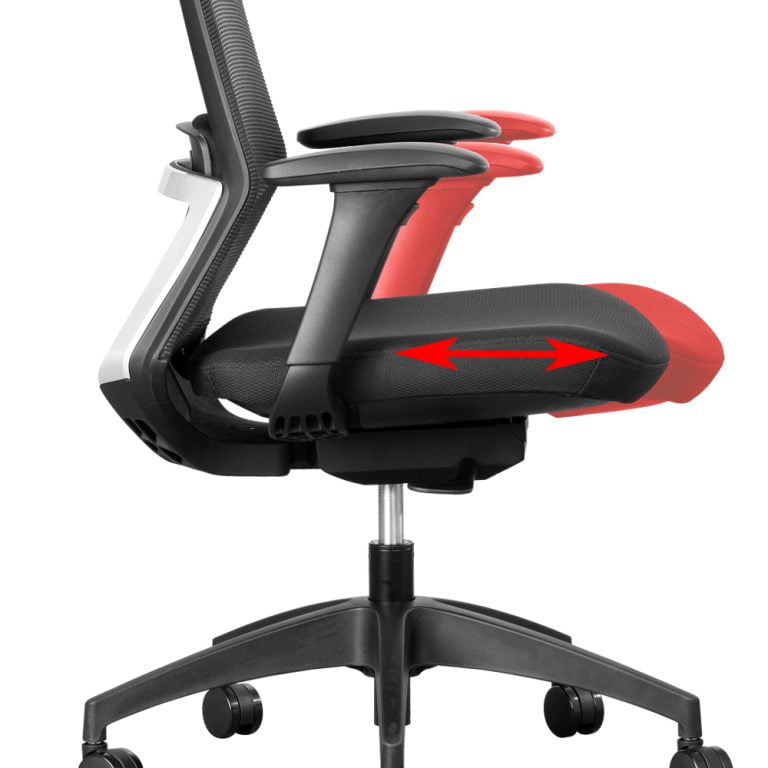
A seat slider allows you to move the seat pan backward or forward to suit the length of your thighs.
If you are tall, a chair with a seat slider is one of the most important adjustments available.
Many people buy expensive ergonomic chairs but never adjust the seat depth. This often results in sitting on the front edge of the seat, eliminating the benefit of the lumbar support altogether.
Ergonomist's Tip
- Ensure that there is at least a 2-3 finger gap between the front edge of the seat and the back of your knees. This will reduce tension behind the knees, provide appropriate upper leg support, and improve blood flow.
- The seat depth must not be too deep because you will end up sitting on the front edge of the seat with no back support.
- If the seat depth is too shallow, much of your thigh remains unsupported, increasing pressure on your sitting bones.
- Your lower back should always remain in contact with the backrest.
4. Seat angle adjustment
Adjusting the seat angle is only possible on an office chair fitted with a synchronous (synchro) or free-float mechanism.
Synchronous mechanisms
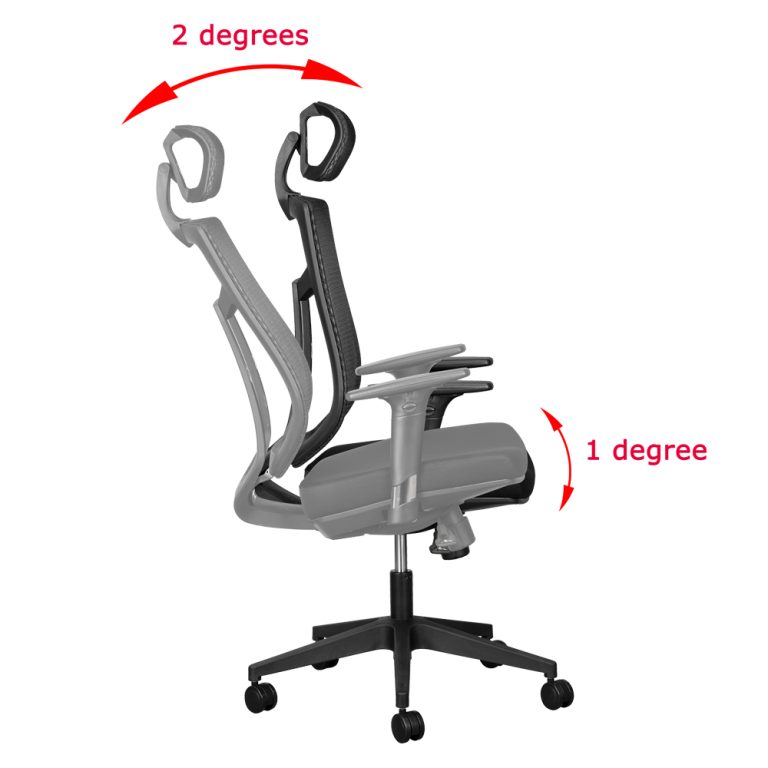
The mechanical link on a synchronous mechanism simultaneously changes the chair’s backrest and seat angle in a fixed ratio. Synchro mechanisms usually have a 2:1 ratio, meaning that the backrest moves 20 for every 10 of movement in the seat. Most ergonomic office chairs have a synchronous mechanism.
Free-float mechanisms
A free-float mechanism allows you to change the seat angle independently from the backrest. Furthermore, the seat can be adjusted to a forward sloping position which reduces the disc pressure in the lumbar region of your back. All orthopedic office chairs have a free-float mechanism.
5. Backrest movement (tilt) helps reduce muscle fatigue
An office chair with a fully adjustable backrest allows you to change the angle between your torso and thighs anywhere from about 90 to 1100. The backrest can typically be locked in any position within this range. It is recommended to keep the backrest in a free-float (rocking) motion to promote continuous support as you sit and move in the chair.
Ergonomist's Tip
- Always maintain constant contact with the backrest to maximise comfort and improve muscle stimulation and blood circulation.
- Sit far back in your chair and allow the backrest to support your entire back.
6. Backrest tension adjustment should match your body weight
The backrest angle and backrest tension adjustments go hand-in-hand. The recline tension controls how easily the chair leans backwards.
- If the tension is too loose, the chair provides little support.
- If it's too tight, you'll avoid reclining altogether and remain in a static posture.
The ideal tension allows you to easily recline back in your chair while there is still enough resistance to support your back. Some chairs have a self-tensioning feature built into the mechanism which will automatically tension the backrest according to your body weight. Tilt Tension Troubles: How to Get It Just Right
7. Adjusting the lumbar support on an office chair
An adjustable lumbar support allows you to position the lumbar pad to fit the curvature of your spine. Lumbar support is one of the most misunderstood features of an ergonomic chair. Many people assume more pressure equals better support.
In practice, excessive lumbar pressure often creates discomfort rather than relieving it.
A good lumbar support should simply fill the natural curve of your lower back. If the support is adjustable, position it so it aligns with the small of your back without forcing your spine into an exaggerated curve.
The best lumbar support is the one you barely notice.
Ergonomist's Tip
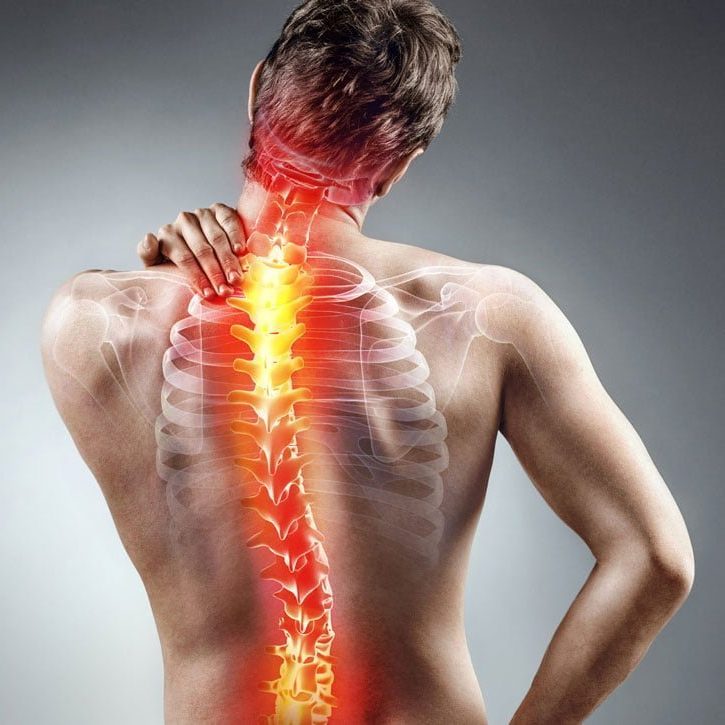
- Do not over accentuate the back support into the inward curve of your spine. The additional horizontal pressure will cause unnecessary strain in your lumbar area.
- Make sure the lumbar support is not too high or low, as this might cause slouching and discomfort.
- Sit as far back as possible in your seat with your back fully supported by the backrest.
Some office chairs have a fully adjustable backrest. These backrests can be raised or lowered to position them so that they support the natural curvature of your spine.
8. Adjustable armrests reduce upper back and shoulder strain
Adjustable arms will allow you to customise the height and/or distance between the arms as well as the position of the arm pads to suit your body.
Armrests support the weight of your arms and help reduce tension through the shoulders and neck. Ideally, your:
- shoulders remain relaxed
- elbows rest at approximately 90 degrees
- forearms remain parallel with the floor.
Multi-adjustable armrests that move up, down, forwards, backwards and sideways provide the greatest flexibility, particularly if you frequently use a keyboard and mouse.
Not every task requires armrests, but when properly adjusted they can significantly improve comfort during computer work.
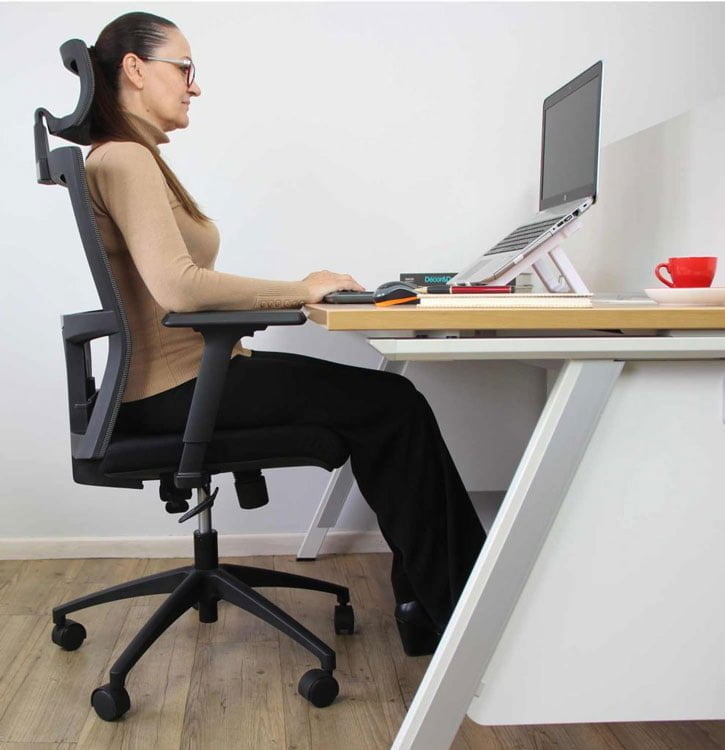
9. Adjustable head/neck rest for your office chair
Not all ergonomic office chairs have them and not every person requires a neck or headrest.
Adjustable neck rests are generally not used continuously. Typically, they are only used to support your neck and shoulders when you want to relax or to help reduce stress and stiffness in your neck, back and shoulders. Many of the desk chairs that we have on sale include an adjustable headrest.
Headrests or neck rests can be a great ergonomic addition to your office chair. Select a chair where both the height and angle of the headrest can be suitably adjusted. An office chair headrest that is not suited to your body can cause more harm than good. This is especially so if it forces your head into a position that results in muscular pain.
Frequently Asked Questions (FAQ's)
a. Can a fully adjustable office chair reduce back pain?
A properly adjusted ergonomic chair can reduce many of the postural stresses associated with prolonged sitting. However, no chair can eliminate discomfort caused by remaining seated for long periods. Regular movement and good workstation setup remain equally important.
b. Is an expensive office chair always better?
Not necessarily. A chair that fits your body correctly is usually more comfortable than an expensive chair with limited adjustment. Fit matters more than price.
c. What is the single most important chair adjustment?
Seat height is usually the first adjustment to make because it affects your posture relative to your desk, keyboard and monitor. Once the height is correct, adjust the lumbar support, recline and seat depth.
d. Should I lock my chair upright?
Generally, no. Allowing the chair to move with your body (Dynamic Sitting) encourages muscle activity and improves circulation throughout the day.
The bottom line
A fully adjustable office chair is not about having more levers or knobs. It's about giving your body the support it needs throughout the working day.
The best ergonomic chair is one that adapts to your body, not the other way around.
Before comparing brands, make sure the chair allows you to adjust the features that matter most: seat height, seat depth, lumbar support, backrest movement and armrests. Once those adjustments fit your body correctly, you'll be far more likely to remain comfortable, maintain healthier posture and reduce the aches and pains commonly associated with prolonged sitting.
Contact us for more information on our business furniture solutions.
By the same author:

The Ultimate Guide to Exercises and Stretches for Office Workers
Are you feeling stiff and fatigued after long hours at your desk? Reduce aches, improve focus and feel better throughout your working day.

The Health Risks of Sitting Too Long – and 5 Practical Ways to Reduce Them
Discover how prolonged sitting affects your body, what the research says, and the practical steps you can take to stay healthier and more comfortable at work.
Orthopedic vs Ergonomic Office Chairs: What’s the Difference and Which Should You Choose?
Ergonomic and orthopedic office chairs are very similar. What are the major differences and which is best?