

Healthy Sitting Position at a Desk: How to Sit Correctly at Work
- Updated:
About the author:

Ronel Hendry
“Create Healthy Workspaces”
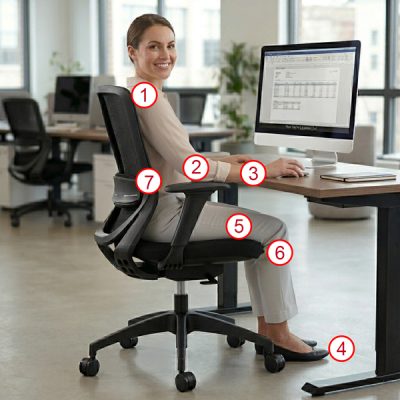
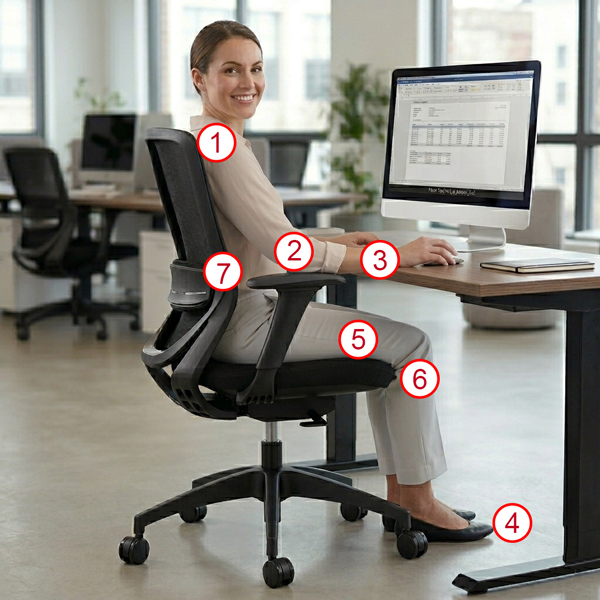
A healthy sitting position at your desk means your feet are flat on the floor, your knees are slightly lower than your hips, your lower back is supported, your elbows are bent at about 90 degrees, your shoulders remain relaxed, and your forearms are supported on the armrests or the surface of the desk. Your spine should stay in a neutral position while your chair supports natural movement throughout the day.
If your neck, shoulders or lower back ache after a day at your desk, your sitting position or workstation setup may be contributing to the problem.
According to Harvard Medical School, prolonged sitting has also been associated with broader health concerns such as:
- neck and shoulder strain
- lower back pain
- poor circulation
- fatigue
- headaches
- constipation
- heartburn
- and reduced concentration.
Healthy Sitting Position Checklist
Use this quick checklist to improve your posture while sitting at your desk:
- Shoulders relaxed, not elevated
- Elbows bent at roughly 90 degrees
- Forearms parallel to the floor and supported by the armrests or desk surface
- Feet flat on the floor or on a footrest
- Knees slightly lower than hips
- A 2-3 finger gap between front edge of the seat and the back of your knees
- Back fully supported by the backrest with the lumbar support fitted into the curve of your lower back.
Why your sitting position matters
After assessing hundreds of office workstations, the two most common problems we see are people using a chair that doesn't suit their body shape, or using a chair that has been incorrectly adjusted. Many people sit:
- with the seat adjusted to the incorrect height
- on the front edge of the seat with their back not fully supported by the backrest
- with hunched or drooping shoulders because the armrests are too high or too low.
These small setup errors place continuous stress on your muscles, joints and spinal discs. Over time, this impacts your overall wellbeing through discomfort, fatigue and reduced productivity. A properly adjusted ergonomic chair helps distribute pressure more evenly across your body and reduces unnecessary muscular tension.
If it is adjusted incorrectly, even the most expensive office chair will not help ease discomfort and back pain.
There Is No Single “Perfect” Sitting Position
There is no single posture that is healthy all day long. The healthiest sitting position is one that:
- supports your body
- reduces muscular strain
- and allows regular movement throughout the day.
Even good posture becomes unhealthy if you remain static for hours.
A video guide on how to correctly adjust your office chair, desk and monitor.
Mayo Clinic:
Office ergonomics: Your how-to guide
A healthy sitting position – what is the right way to sit?
1. Adjusting the seat height
Your chair is at the correct height when both your feet are flat on the floor (or on a footrest), and your knees are slightly lower than your hips.
Sitting at this height prevents undue pressure on lumbar discs and avoids muscular tension in your shoulders and neck. What is the correct ergonomic height for my desk, computer monitor and office chair?
a. If the seat is too low:
- your knees will be higher than your hips,
- pressure increases in your lumbar discs
- you typically need to lift your arms to reach the work surface which causes muscular tension in your shoulders and neck.
b. If the seat is too high:
- your feet may not reach the floor (dangling feet)
- pressure develops under your thighs.
- you perch on the edge of the seat with no back support.
- If the height of your work surface is fixed, then use a footrest to prevent dangling feet.

Seat height adjustment
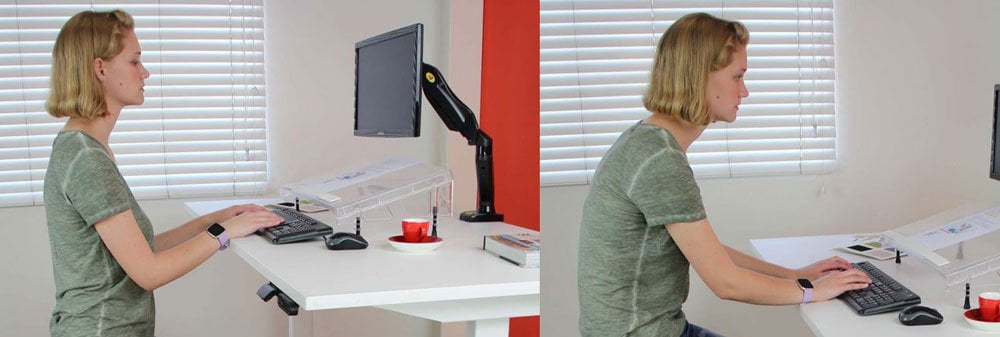
Left: Seat height is too low and angle of the elbows is less than 90 degrees. Forearms are not parallel to the floor.
Right: Seat is too high and angle of the elbows is greater than 90 degrees. Again, forearms are not parallel to the floor. The hunched back typically results in muscular pain in the upper back and shoulders.
2. Adjust the depth of the seat (seat slider)
A seat slider allows you to move the seat forwards or backwards to suit the length of your thighs. Note: Not all office chairs have a seat slider.
When seated correctly with your back against the backrest, there should be a 2–3 finger gap between the front edge of the seat and the back of your knees. This helps to:
- reduce pressure behind the knees,
- improve circulation,
- support your upper legs properly.
For taller individuals with long legs, a seat slider allows them to increase the seat depth, thereby maintaining a good sitting position. Conversely, shorter people should consider reducing the seat depth.
If the seat is excessively long (deep), anyone with shorter legs might find themselves sitting on the front edge of the seat, leading to a lack of adequate back support.
The seat should also have a slight downwards curve in the front (waterfall front), to reduce the pressure on the back of your thighs.
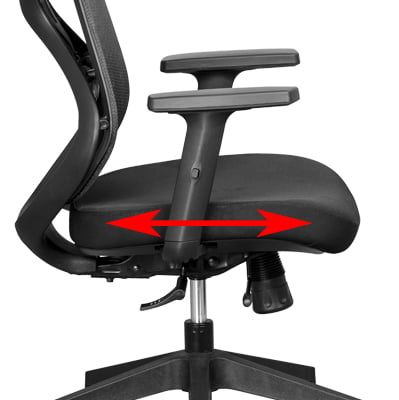
A good sitting position is when your back is properly supported by the backrest and there is a 2-3 finger gap between the front edge of the seat and the back of your knees.
Click here to see which chairs have a seat slider that allows seat depth adjustment.

3. Armrest adjustment for a good sitting position
When seated on the chair, your forearms should be parallel to the floor and your elbows should be bent at about 900. Incorrect armrest positioning can lead to muscle tension in your neck, shoulders, arms, and wrists.
- When it comes to armrests, the most common ergonomic mistake is adjusting them to the incorrect height. This can cause muscle tension in your neck, shoulders, arms and wrists.
- Arm pads that move forward and backwards will allow you to sit closer to your desk. Your desk surface can then be used to support your forearms, wrists and hands.
- Armrests that are width adjustable or where the arm pads can pivot inwards are an advantage. If the armrests are too far apart, they will not be directly under your elbows and forearms and will therefore not provide the proper support and comfort.

4. Backrest angle adjustment
A chair that allows you to recline the backrest angle between 900 and 1100 is ideal. Sit with your back fully against the backrest. What is the difference between office chair mechanisms?
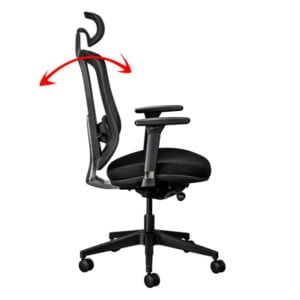
For many people, a free-floating backrest provides better support because it encourages movement throughout the day. Furthermore, tiredness will be reduced as your core muscles will be stimulated and blood flow improved.
Adjust the spring tension in the backrest to match your body weight. Tilt Tension Troubles: How to Get It Just Right
Some chairs automatically adjust the spring tension in the mechanism to suit your body weight. Click here to see which chairs have an automatic self-adjusting tension mechanism.
5. Good lumbar support is important for a healthy sitting position
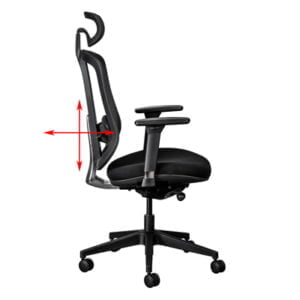
Your lower back should remain fully supported while sitting.
- Position the lumbar support so it fits naturally into the curve of your lower back. This helps maintain a neutral spine position and reduces stress on spinal discs.
- Your backrest should ideally recline slightly between 100 and 110 degrees. A small recline often reduces spinal pressure more effectively than sitting perfectly upright all day.
- Keep the backrest in a free-floating position so it moves naturally with your body. Chairs with dynamic sitting encourage muscle activity which improves circulation and reduces muscle fatigue.
6. A headrest may improve your sitting position
Not all ergonomic chairs have a headrest and not every person needs one.
If your chair has a headrest, ensure it supports your neck and shoulders in their natural position. Improper headrest positioning can lead to tension headaches, upper back pain, and neck strain.
The headrest should be positioned so that it supports head in it’s natural position. In other words, the headrest must not push your head forward or allow it to fall backwards.
A headrest that is not suited to your height can cause more harm than good.
A headrest that is too low, may force you to hunch over and extend your neck forward. The forward angle of your head can result in tension headaches, upper back, shoulder, and neck pain.
For tall people, ensure that the headrest can be extended high enough to correctly support your neck and head. Best office chairs with a headrest for tall people.


An unhealthy sitting position – Common sitting mistakes to avoid
Don’t:
- Lean to one side – it can cause your spine to curve.
- Hunch your shoulders – it may result in a forward head posture, neck strain, headaches and breathing difficulties.
- Lift your shoulders – it can cause muscular tension in your neck and shoulders.
- Sit forward without back support – the natural curve and alignment in your back won’t be supported.
- Cross your ankles or knees – it can lead to constricted blood flow, increased blood pressure and cause varicose veins.
- Let your feet dangle – it can cause constant pressure under your thighs and result in poor blood circulation and potential muscle pain.
- Keep your backrest in a fixed position – keep the backrest in a free-float position to continually stimulate muscles and blood circulation. This prevents lower back pain. If you have to keep your backrest in a fixed position for whatever reason, it is advisable to have your backrest in a slight recline.
- Sit for periods longer than 60 minutes without taking a break – sitting in a static position for a long time puts huge stress on your neck, spine and back muscles. When your body gets tired or you experience discomfort, get up and move around, have a tea break, go for a walk, or do some exercises. Simple exercises for office workers
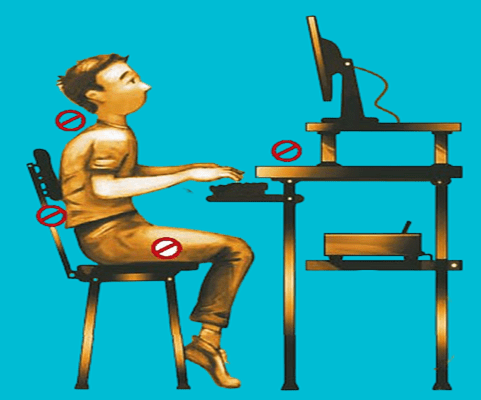
Taking breaks or doing a short workout increases energy, productivity and creativity, while also reducing stress and possible burnout.
Movement matters!
Many people search for the “perfect” sitting position, but movement is equally important. Your body is designed to move regularly and not remain fixed in one position all day. The healthiest sitting posture is one that:
- supports your body
- allows movement
- reduces muscular tension
- and changes regularly throughout the day.
Simple habits such as:
- standing briefly
- stretching
- walking
- or changing your sitting angle
can significantly reduce fatigue and discomfort.
Frequently Asked Questions (FAQ's)
a. What is the healthiest sitting position at a desk?
A healthy sitting position at your desk means your feet are flat on the floor, your knees are slightly lower than your hips, your lower back is supported, your elbows are bent at about 90 degrees, your shoulders remain relaxed, and your forearms are supported on the armrests or the surface of the desk. Your spine should stay in a neutral position while your chair supports natural movement throughout the day.
b. Should your knees be higher than your hips?
No. Your knees should always be slightly below the level of your hips.
c. Is sitting upright at 90 degrees bad?
It's not necessarily bad, but opening up the angle to about 100 degrees reduces pressure in the lumbar discs and prevents lower back pain.
d. How often should you stand up from your desk?
Roughly every 45 to 60 minutes.
e. Should armrests be level with the desk?
Yes. The arm pads and the surface of the desk should be in alignment.
f. Should the chair mechanism facilitate movement?
Yes. Dynamic sitting encourages muscle activity which improves circulation and reduces muscle fatigue.
Conclusion
A healthy sitting position reduces strain on your body, improves comfort and helps you remain productive throughout the day. The goal is not rigid “perfect posture”, but rather a supported, comfortable and dynamic sitting position that encourages regular movement. Even small adjustments to your chair setup can make a significant difference to:
- lower back pain
- neck tension
- fatigue
- and long-term wellbeing.
If your current chair cannot be adjusted correctly, it may be limiting your ability to sit comfortably and work productively.
The right sitting position should help you finish the workday feeling supported, focused and less fatigued, not stiff, distracted or in pain.
By the same author:
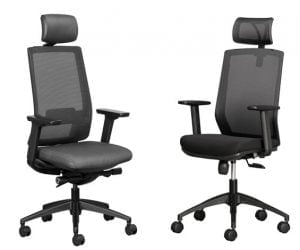

Why a fully adjustable office chair is important
We are all different, so when you buy a new office chair, look for one that has all the adjustability features.
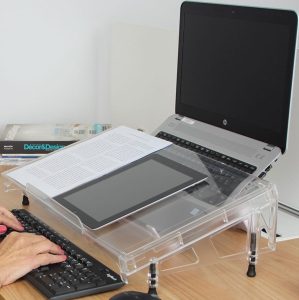
What are the health benefits of a document holder?
One of the best ergonomic accessories you can get is a document holder.

Unveiling the True Cost of Ergonomic Office Chairs: Are they Worth the Investment?
Although the upfront cost of ergonomic office chairs may seem high, over their lifespan they are a low-cost and smart investment.