

Call Centre and Control Room Chairs: How to Choose Seating for 24/7 Operations
- Updated:
About the author:

George Mashinini

“Create Healthy Workspaces”
A standard office chair may perform perfectly well in a typical workplace. One person uses it for eight hours a day, makes a few adjustments during the course of the day before leaving at the end of their shift. A call centre or control room is completely different because in such an office a single chair may be used around the clock by multiple operators. One shift ends, another begins, and the chair is reset for a new user with a different body shape and size.
The challenge isn't simply finding a stronger chair. It's finding a chair that can be adjusted quickly for multiple operators while surviving heavy-duty use in a tough 24/7 environment.
Choose the wrong chair and you may face frequent breakdowns, operator discomfort, presenteeism, and ongoing replacement costs. Choose the right one and you can improve comfort, productivity and long-term value.
In this article, you'll learn what makes a true control room or call centre chair and which features matter most in a 24/7 environment.
Why Standard Office Chairs Often Fail in Control Rooms and Call Centres
Most office chairs are designed for a single user working a conventional 8-hour day, 5 days a week.
In a call centre or control room, the reality is very different as the same chair is occupied for 24 hours a day, seven days a week. It may be used by three different operators every day, each requiring different adjustments. Unlike a traditional office environment, no single person is responsible or has 'ownership' of the chair. Shared equipment often experiences more aggressive use, more frequent adjustments and less day-to-day care than seating assigned to an individual employee. As a result, components experience significantly higher levels of wear and tear, including:
- Chair mechanisms and gas lifts
- Armrests
- Castors
- Seat cushions
- Upholstery and/or mesh
- Structural frames
What works well in a conventional office can fail prematurely in a continuous-use environment. 7 Elements of Effective Control Room Design
The Hidden Challenge of Multi-User Seating
Many organisations focus solely on durability when selecting call centre or control room chairs. Although durability is important, it is only half the solution.
A chair can be incredibly strong, but if operators cannot adjust it quickly and correctly to suit their body shape, it may still create discomfort, back pain, and poor posture.
In a shared environment, users vary significantly in:
- Height
- Weight
- Leg length
- Torso length
- Sitting preferences
The best control room and call centre office chairs are designed to accommodate these differences quickly and easily. This is why ergonomic adjustability is just as important as strength.
What Is a 24/7 Control Room or Call Centre Chair?
A 24/7 heavy-duty chair is specifically designed for intensive workplace environments where seating is continuously occupied. These chairs combine:
- Heavy-duty construction
- Enhanced ergonomic support
- Extensive and simple adjustability
- Components designed for continuous heavy-duty use. What defines a 24/7 chair?
The goal is simple: provide reliable comfort and support regardless of who is using the chair or how often it is used.

Essential Features of Call Centre and Control Room Office Chairs
In multi-user environments, the challenge is not durability alone, it is fast, repeatable adjustability without compromising strength. The following features allow operators of different sizes and body shapes to quickly adjust the chair while ensuring it can withstand continuous 24/7 use.
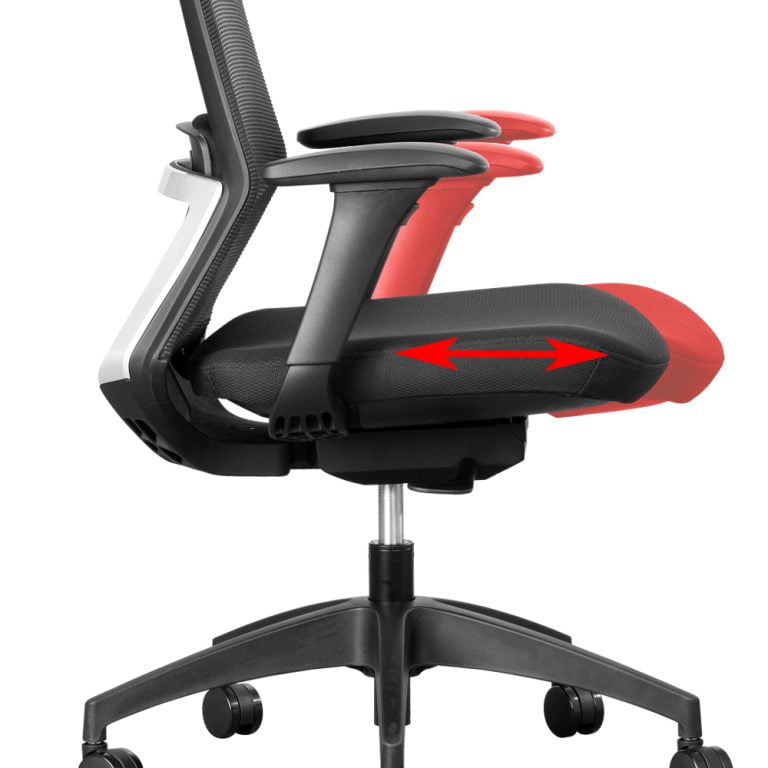
a. Seat Depth Adjustment (Seat Slider)
One of the most important features in a shared environment is a seat slider because operators have different leg lengths. A seat that fits one person perfectly may be too deep or too shallow for another.
A seat slider allows the seat depth to be adjusted to suit different users, helping maintain proper contact with the backrest while reducing pressure behind the knees by maintaining a 2-3 finger gap between the front edge of the seat and the back of the knees.
This simple feature can make a significant difference to comfort during long shifts.
b. Backrest Angle Adjustment
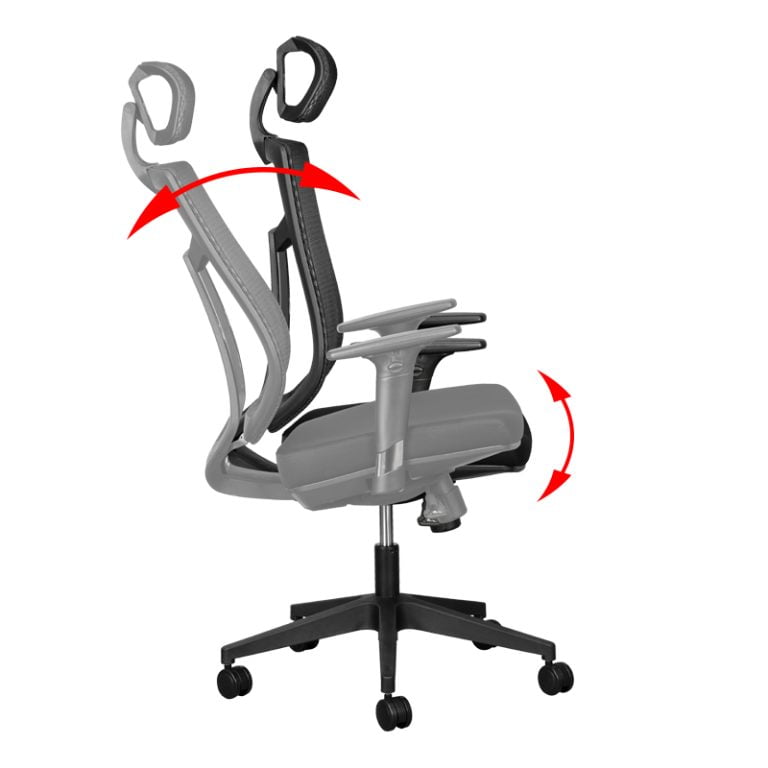
Each operator must be able to position the backrest of the chair in a way that suits their body and the way they prefer to work.
The angle between the backrest and seat of the chair must be adjustable. By altering the angle from an upright to a more reclined position the muscles in the lumbar region of the back are automatically stimulated which promotes blood flow and reduces muscular tension and pain.
This is known as dynamic sitting which is associated with chairs that have either a Synchronous (synchro) or Free-Float mechanism.
c. Fully Adjustable Armrests
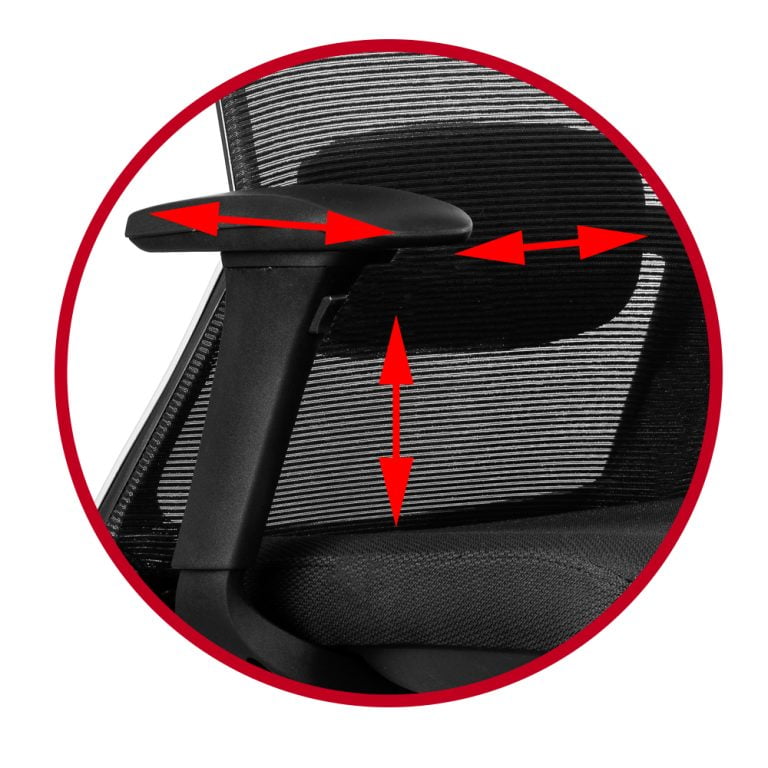
Operators often spend hours using keyboards, mice, telephones, touchscreens and multiple monitors. Without adequate arm support, the shoulders must work harder to support the weight of the arms, contributing to fatigue and upper back pain. Users should be able to adjust the armrest:
- Height
- Width
- Depth
- Pivot angle
This helps position the arms comfortably and supports a more relaxed working posture.
d. Adjustable Lumbar Support
We do not all have the same shape of back and we all have slightly different needs when it comes to back support. Office ergonomics: Your how-to guide
An adjustable lumbar support allows each operator to position support where it is needed most. This helps maintain the natural ‘S’ shaped curve of the spine and promotes healthier sitting habits during extended periods of seated work.
e. Heavy-Duty Base and Castors
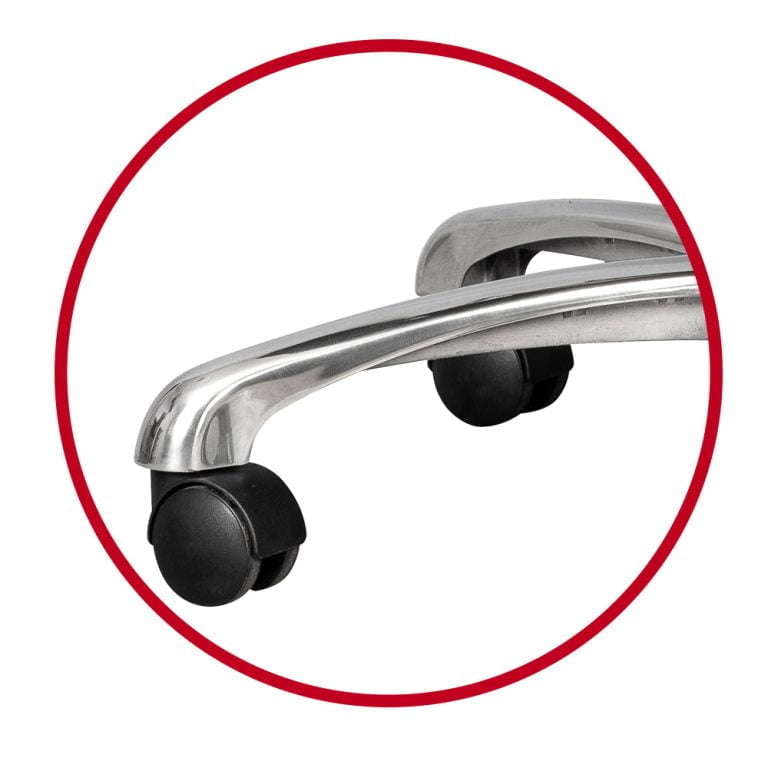
Chairs with a reinforced aluminium base provide greater strength, stability and durability, particularly in demanding workplace environments like a call centre.
For a heavy duty office chair, it is better to have large diameter castors. Larger wheels result in a higher carrying capacity, so 60 or 75mm diameter castors will carry a greater load and be more maneuverable.
If the chair is used on a hard surface such as a tiled floor, soft rimmed castors roll better and won’t damage the floor. Hard castors work fine on a carpeted floor.
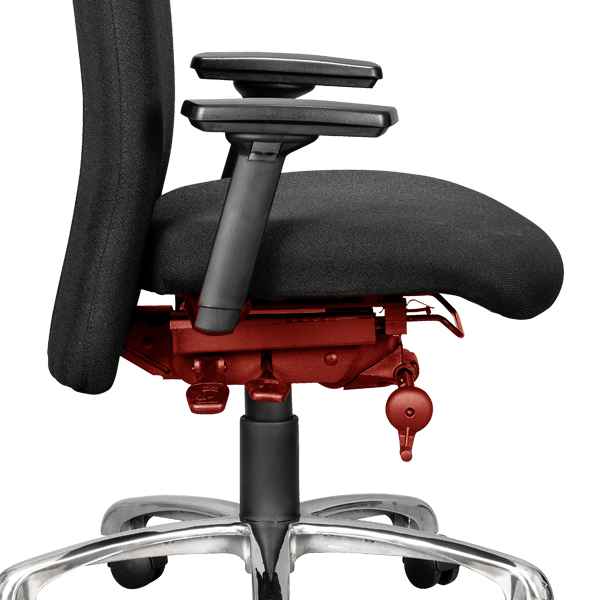
f. High-Strength Mechanism and Gas Lift
The mechanism is one of the hardest-working components of any office chair. Every recline, movement and adjustment places stress on this system and in a 24/7 environment, these loads are multiplied many times over.
Heavy-duty chairs use reinforced mechanisms designed to withstand intensive daily use and significantly higher usage cycles by different operators.
To ensure durability, the mechanism should be independently tested to recognised strength and durability standards.
A heavy-duty gas lift is designed to handle frequent adjustment while supporting a wide range of user weights. A Class 4 gas lift is preferred because it has a higher load rating than the standard Class 3. Gas lifters without this mark may be inferior and may also not support the required weight or load.
g. Call Centre Office Chairs Should Have a High Weight Rating
Many call centres and control rooms require seating capable of accommodating a broad range of users, and chairs should be rated for users weighing 150kg or more. The stronger construction not only supports larger users but also improves durability across the entire workforce. The Ultimate Guide to Office Chair Weight Limits
h. Easy-to-Use Controls
The best ergonomic features are useless if operators do not use them. Controls should be intuitive, clearly marked and easy to access. When adjustments can be made quickly between shifts, operators are more likely to personalise the chair and adopt a healthy sitting position.
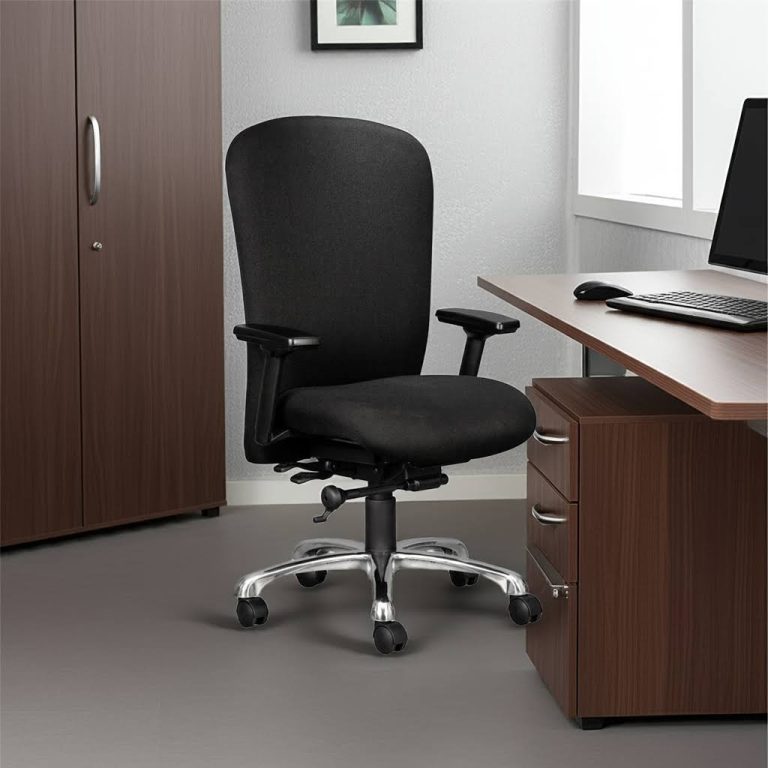
Heavy-Duty Call Centre and Control Room Chairs with a 180kg Weight Rating
The Heathrow 247/ and Ortho2XL are heavy duty chairs designed for individuals up to 180kg.
Why Investing in the Right Chair Saves Money
A standard office chair may appear less expensive initially. However, in a 24/7 environment, lower-cost seating often leads to:
- More frequent replacements
- Increased maintenance
- Reduced operator comfort
- Greater workplace disruption
A purpose-built call centre chair is designed to withstand these demands. While the initial investment may be higher, the longer lifespan and improved reliability often result in a lower total cost of ownership.
Industries That Depend on 24/7 Seating
Heavy-duty chairs are commonly found in:
- Call Centres
- Security Control Rooms
- Emergency Dispatch Centres
- Utilities and Infrastructure Operations
- Mining and Industrial Facilities
- Logistics and Transport Operations
How to Choose the Best Control Room or Call Centre Chair
When evaluating seating options for call centres and control rooms, ask the following questions:
- Is the chair designed for 24/7 use?
- Can it accommodate multiple users quickly and easily?
- Does it include a seat slider?
- Are the armrests fully adjustable?
- Does it have a synchronous or free-float mechanism?
- Is the mechanism designed for heavy-duty use?
- Is the gas lift suitable for intensive operation?
- Does it have a reinforced base and heavy-duty castors?
- Is it suitable for users weighing 150 kg or more?
- Is it backed by a warranty appropriate for demanding environments?
If the answer to several of these questions is no, the chair may not be suitable for continuous operation.
The Bottom Line
Control rooms and call centres place unique demands on workplace seating and you shouldn't buy seating without a Workplace Risk Assessment.
The challenge is not simply finding a chair that is stronger, it is finding a chair that can accommodate multiple users, support long periods of sitting and withstand continuous operation year after year.
The best call centre and control room chairs do more than withstand heavy use. They allow operators of different sizes to quickly achieve a comfortable working position while delivering the strength and durability required for continuous 24/7 operation. When evaluating seating, look beyond weight ratings alone and focus on the combination of ergonomic adjustability and heavy-duty construction.
Call Centre and Control Room Office Chairs
By the same author:


Is a More Expensive Ergonomic Chair Always Better? Exploring Inexpensive Office Chairs
Discover whether expensive or inexpensive office chairs are better, balancing comfort, support, and cost-effectiveness.

Hybrid Working: Your Ultimate Guide to a Flexible Future
Discover how hybrid working is reshaping the definition of office space and changing the way businesses operate today.
How To Choose The Right Ergonomic Desk Chair
The best ergonomic desk chair is one that fits your body shape, work style and comfort requirements. Because people differ in height, leg length, torso length and weight, there is no single office chair that suits everyone.